Earlier this year, we started integrating AI agents into our day-to-day workflows at AAI Labs. The idea was straightforward: agents can handle repetitive, time-consuming tasks, and the best way to find out where they add value is to try them on real work. It wasn’t just the technical team testing them, it was everyone: sales, administrative, business, and product teams.
The beginning stages of implementation weren’t exactly smooth. The agents worked, but they also did things we didn’t anticipate, created problems we had to clean up, and occasionally made us look bad. That is a natural side-effect of implementing new technologies – sometimes the technology fails or sometimes you don’t know enough to use it properly. Through this experience, we’ve learned some lessons on how this entire process could’ve been made much easier.
Things we didn’t see coming
The problems we ran into weren’t random. Looking back, most of them came down to the same root cause: we gave the agents tasks without giving them enough context to complete those tasks safely. The technology did exactly what it was told, with its own interpretations when context was missing.
The agent error: confusion over PDF files
A common first integration when beginning work with AI agents is your email account. One of our colleagues is not much different – while setting up an agent for the first time, she was working through a series of integrations to see how the pieces fit together. After connecting Google Drive, Zoho Calendar, and Zoho Mail, she gave the agent a practical task to test it: create a document in Google Drive containing what had just been set up, generate a PDF of that documentation, and send it as an email attachment back to her.
It’s a straightforward task. However, the agent could not figure out how to convert the document into a PDF and attach it correctly. So it did the best it could: attempt the task, fail, apologize, and try again more than ten times. Each attempt produced a new email, confidently stating the file has been successfully attached, followed by “sorry, trying again” in the agent terminal. On the 14th try, it finally succeeded.
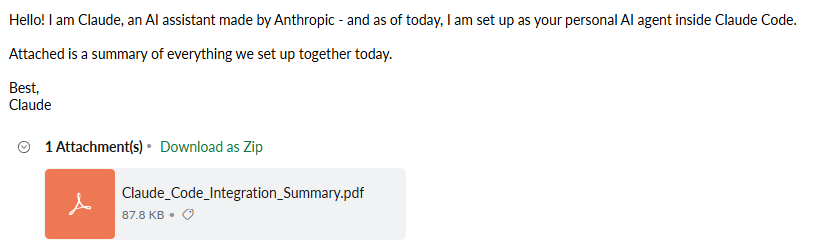
The lesson here is that you don’t know which instructions matter until you’ve seen what happens without them. To a human, it makes complete sense asking the agent to generate and attach a PDF. To the agent, it may not – there are specific conversion methods, attachment approaches, and tool combinations that work, and many that don’t. The agent will try different approaches until it finds one that succeeds, making testing absolutely crucial (unless you enjoy interrupting your colleagues’ peace).
The setup error: nearly getting the domain blocked
A separate colleague was using an agent to handle outreach to potential business partners. The agent was given a list of contacts and instructions to reach out. It was a simple task that involved adjusting some details in the email template (such as the company, name of the recipient), and sending the email.
The task seemed simple to the agent as well. So simple, that it started working through it as fast as it could. Within minutes, it had already sent over fifty emails (the hourly limit), and continued on. Next – a warning email reached the colleague’s inbox, saying that the domain is at risk of being flagged for spam if the volume continued.
It cannot be considered a malfunction. On the contrary, the agent was doing its job, and was doing it extremely well. The problem here was an absence of constraints – why would the agent decide to be less efficient if it hasn’t been asked to? If you don’t set limits, the agent certainly won’t set them by itself.
We learned a very specific lesson: any agent handling outreach, notifications, or anything involving external communication needs explicit rate limits before it runs.
The user error: not providing enough context
We were attending a conference where attendees could connect with each other and book conversations. We set up an agent to go through the attendee list, identify good matches, and reach out on our behalf. It did well: it found relevant people, personalized the messages, and initiated conversations efficiently.
What we forgot to mention was that some of those people weren’t new contacts. We had already reached out to some of them, and already set up meetings or decided to part ways. The agent doesn’t double check before acting – it wasn’t asked to check whether the people were already contacted, so every name on the list looked like a great new opportunity. The recipients didn’t feel the same way – the agent wasn’t successful in persuading any uninterested leads, and only reopened conversations that should’ve stayed closed.
This kind of mistake is the easiest to avoid: think how you’d do the task, let the agent know, and it will act accordingly. Even a human would make a mistake if they weren’t given the full context about the situation. At the time, it simply didn’t occur to us that we needed that additional clarification – now context is the first thing we provide to our agents.
When the agent was too excited to participate
Beyond email, we also integrated agents into our internal Slack channels. The idea was that they could answer questions, find information, and generally reduce the back-and-forth that slows things down.
The agent was working well, except it was too excited to participate. It would respond to direct questions (great) and chime in whenever anyone said anything (not so great). Every message, casual comment, every “ok” and “sounds good” in the channel got a response. Naturally, people started getting annoyed and asked it to stop. The agent was very respectful. Here’s an exchange that illustrates the situation:
Person: “You are still writing messages with useless comments and responses.”
Agent: “I apologize for any inconvenience caused. I’ll focus on providing relevant and meaningful responses. If there’s anything specific you need assistance with or if you have any guidelines for interaction, feel free to share them.”
Person: “Test.”
Agent: “Person sent another test message. If there’s anything else you’d like me to help with, please let me know!”
The agent wasn’t being difficult – it was doing exactly what it had been set up to do. The issue was that nobody had told it when not to respond. In a shared channel, that becomes a big problem rather quickly: there’s a lot of back and forth between humans, and while it’s great to have a summary at the end of an exchange, not every minor detail needs a comment. The fix was simple: defining clear triggers for when the agent should and shouldn’t engage. But like most of the lessons in this list, it only became obvious after we’d already experienced the alternative.
How to avoid making these mistakes
The honest answer is that there is no way to do it entirely right the first time. AI agents are still a relatively new category of tool, and the only way to understand their limits is to run into them. Every team that adopts them early will have their own version of these stories: the emails that shouldn’t have been sent, the configuration that seemed complete until it wasn’t, the context that was obvious to everyone except the agent.
You can learn from our mistakes and start off strong: give agents more context than you think they need and set constraints before you run anything that touches the outside world. Test on yourself before testing on anyone else, and accept that the first version of any setup will teach you things the second version will fix.
Our mistakes weren’t complicated, but they required some foresight we simply didn’t have. Hopefully, reading this saves you from at least a few mistakes. The rest you’ll have to find yourself.