It is easy to build a workflow that works on Tuesday. It is much harder to know when it quietly stops working on Thursday.
At AAI Labs, we run automated flows across n8n and Windmill, from client data syncs to invoice processing to AI-powered enrichment pipelines. As those automations moved from proof-of-concept into production, we hit a familiar problem: our platforms told us when a node crashed, but not when a schedule simply never fired, or when a flow "succeeded" with empty results. This is the story of how we built a Minimal Viable Monitoring (MVM) framework to close that gap, without bolting on an expensive observability suite.
The 20% Gap in Native Monitoring
Both n8n and Windmill ship with capable native tooling. Execution logs, retry logic, error-trigger nodes, and built-in alerts cover roughly 70-80% of what a production team needs. We audited both platforms carefully and found a consistent blind spot: neither n8n nor Windmill natively detects "expected schedule" failures. If a cron trigger silently stops firing, or a workflow freezes mid-execution without throwing an exception, the platform reports nothing. There is no log entry to complain about.
That remaining 20% is where real operational risk lives. A frozen enrichment flow means stale client data. A missed invoice run means delayed payments. We needed visibility across both platforms and one unified log of every run.
Minimal Viable Monitoring: The Architecture
Instead of reaching for a heavyweight APM stack, we designed a lightweight, cross-layer architecture that builds on what the platforms already provide:
- Centralized Error Routing: A single n8n Error Workflow catches every failure from the workflows linked to it, formats it, and routes it to a dedicated
#flow-alertschannel: workflow name, error summary, failed node, and a direct link to the execution. In Windmill, the workspace-level equivalent turned out to be Enterprise-gated on our deployment, so the fallback there is a per-flow error handler posting the same alert format. - Cross-Platform Execution Logging: Every flow writes a start record to a shared
flow_executionstable and updates it on completion or failure. - Silent Failure Detection (Watchdog): A scheduled watchdog scans for workflows that never started or remain stuck in
started. - Business Event Logging: Workflows also emit domain-level events into a companion
flow_eventstable, so the log records outcomes as well as executions. - Dead-Man's Switch: An external health ping detects platform-wide outages before they cascade.
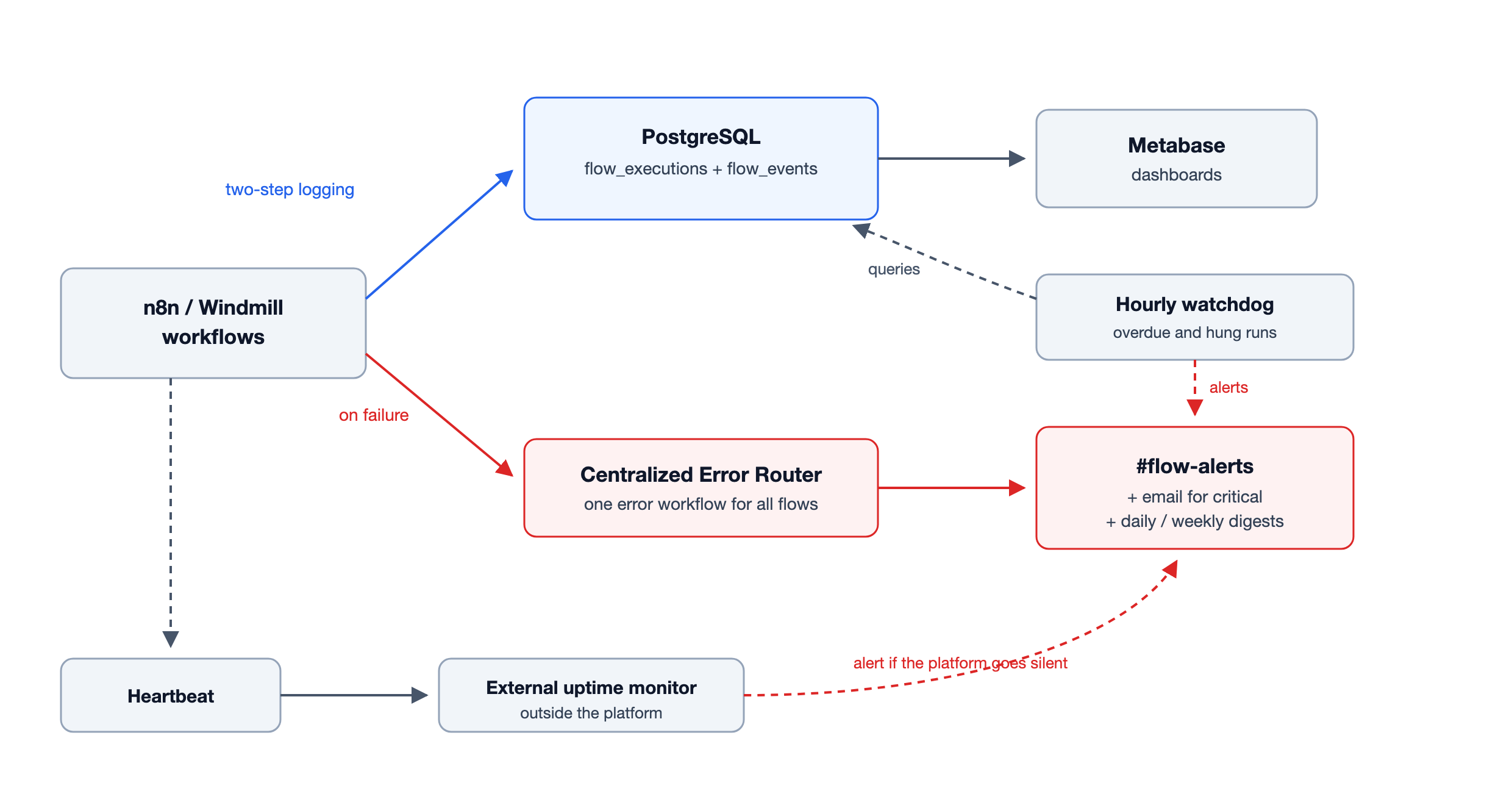
The philosophy was deliberate: use native features as the baseline, and layer custom observability only where there is a genuine gap. For scale: the monitoring investigation wrapped at the end of February 2026, and the centralized error router was catching production failures by March 4, about a week later. Execution logging, business events, and the Metabase dashboards followed in phases over the next three months.
One Logbook, Two Engines
The backbone of the framework is a single flow_executions table in a PostgreSQL analytics database. Every workflow, whether it lives in n8n or Windmill, creates a row on start and updates it on finish, via lightweight HTTP nodes writing through a GraphQL layer. The schema tracks flow_id, run_id, status (started, success, error, timeout), started_at, finished_at, error_message, error_node, platform, and a parent_flow_id that links sub-workflow runs back to their parent.
The two-step write pattern is the critical piece: even if a workflow hangs and never reaches the update node, the started row remains visible. Filtering for runs stuck in started past their expected duration immediately surfaces frozen executions. And from that single table, Metabase dashboards give the team a cross-platform view: no Grafana, no Prometheus, no enterprise-tier log streaming.
The Watchdog: Catching What Schedules Miss
Native error handlers only fire when a workflow actually runs and throws. The watchdog closes the loop. It runs on a schedule, walks the list of active scheduled workflows, calculates when each should have last executed, and checks the flow_executions table for missing entries. If a job is overdue past a safety margin (roughly twice its expected interval, to keep false alarms down), an alert fires.
We also use a dead-man's switch: a minimal heartbeat pings an external uptime monitor on a schedule. If the entire automation platform goes silent, the external monitor fires, catching the failure before the team even notices Slack has gone quiet.
There is a third class of silent failure neither of these can see: the run that finishes green with empty results. That one has to be caught inside the workflow itself. Assert on output shape and count, and alert when processed items drop to zero or deviate sharply from the baseline. The same idea extends beyond failures: a dedicated deviation monitor watches our tender-review pipeline for unusual input volumes, catching drift that produces no error at all.
| Silent failure | What happened | How we catch it |
|---|---|---|
| Never triggered | Schedule broken, workflow deactivated | Watchdog queries flow_executions for overdue jobs |
| Froze mid-run | No crash, but no completion either | Rows stuck in started past expected duration |
| "Succeeded" with bad data | API returned 200 with an empty or wrong payload | Validation inside the workflow on output shape and count |
| Platform down | The orchestrator itself crashed | Dead-man's switch via an external uptime monitor |
Where the Alerts Land
Every failure alert across both platforms lands in one Slack channel, #flow-alerts, in one format: workflow name, timestamp, error message, failed node, and a deep link to the execution. One channel means one place to look, one search history, and no debate about where an alert "should" go.
Not every failure deserves the same urgency, so each workflow carries a criticality level that decides the routing:
| Level | Criteria | Routing | Example |
|---|---|---|---|
| 🔴 Critical | Core business process, data-loss risk | Immediate Slack alert plus email, auto-retry | Invoice processing, client data sync |
| 🟡 Warning | Non-critical failure, or a retry succeeded | Slack channel notice | Weekly report generation |
| 🔵 Info | Successful runs, operational metrics | Daily digest only | Scheduled health checks |
The rule of thumb: if a human needs to know within five minutes, it is critical. If it can wait until morning, it is a warning. If nobody needs to act on it, it is info. On top of the alerts, a weekly execution summary generated from the flow_executions table goes out by email, so the broader team sees the health picture without opening a dashboard.
Some numbers from our own instance: the error router has been live since March 2026 and was wired into our first eleven production workflows, including invoice collection and public tender review; the instance now runs 24 active workflows. A typical week produces a handful of failure alerts, roughly one per day. The busiest minute so far came when a shared dependency broke and dozens of alerts fired in under sixty seconds. That is precisely when a single channel with uniform formatting earns its keep.
Here is a real alert from the channel (execution link redacted), from the very incident described in the next section:
*Workflow Failed*
━━━━━━━━━━━━━━━━━━
 *Workflow:*  EU project statistics - insight generation inner loop
 *Time:*      2026-07-06T10:00:43Z
 *Error:*     The resource you are requesting could not be found
              (404 - ERROR_ROW_DOES_NOT_EXIST)
 *Failed at:* Get row
 *Execution:* [deep link to the execution]
 *Run ID:*    36703
When the Framework Earned Its Keep
One Monday morning in July, the weekly run of our EU funding-call statistics pipeline failed at 10:00. Within ten seconds, the alert shown above was in #flow-alerts, naming the workflow, the failing node, and the exact error.
Here is why that matters. The pipeline runs unattended and feeds weekly funding-call insights, and the cause (a lookup pointing at a record that no longer existed) was permanent, so every following run would have failed the same way. Without the alert, the first sign of trouble would have been someone asking, weeks later, why the insights stopped coming, followed by a cold-start investigation with nothing to go on. With it, the failure was known within seconds, the alert carried everything needed to reproduce it, and the fix shipped three days later.
Detection cost us seconds. Not detecting it would have cost weeks of a silently broken deliverable and the trust that comes with it.
Conclusion
Production-grade automation is not just about building flows that work. It is about knowing, with confidence, when they do not. Our MVM framework took us from scattered, silent scripts to a system with proactive alerts and cross-platform visibility. The approach is platform-agnostic, intentionally lightweight, and built on the principle that observability should be a first-class design requirement, not a Tuesday-afternoon afterthought.
What is your approach to workflow observability? Are you relying entirely on native platform tooling, or have you started layering custom telemetry? We would love to hear what works, and what still keeps you up at night.